Your team’s shared memory.

Decisions, plans, architecture, meeting notes and how-tos, in one place everyone can edit. Run it as a live wiki, or keep it versioned with your code.

Team knowledge tends to live scattered across chat threads, agent context, or a single person’s head. The wiki is out of date because updating it is a chore, and nobody can find the decision from last spring.

Let’s talk about the Driftwood team

Driftwood is a made-up open source photo library app, built by six people. Their decisions used to be buried in chat threads, and the wiki was always out of date.

Now their wiki is a SilverBullet space. Decisions are pages with a status and an owner, the architecture is drawn from the component pages, meeting notes and comments hand out work with @mentions, and the home page shows where the current sprint stands.

Let’s walk through the Driftwood team wiki and see what it looks like; its files are on GitHub. It’s just one example of how a space could be set up. Yours will likely look nothing like it, and that’s exactly the point: you make SilverBullet work the way you want.

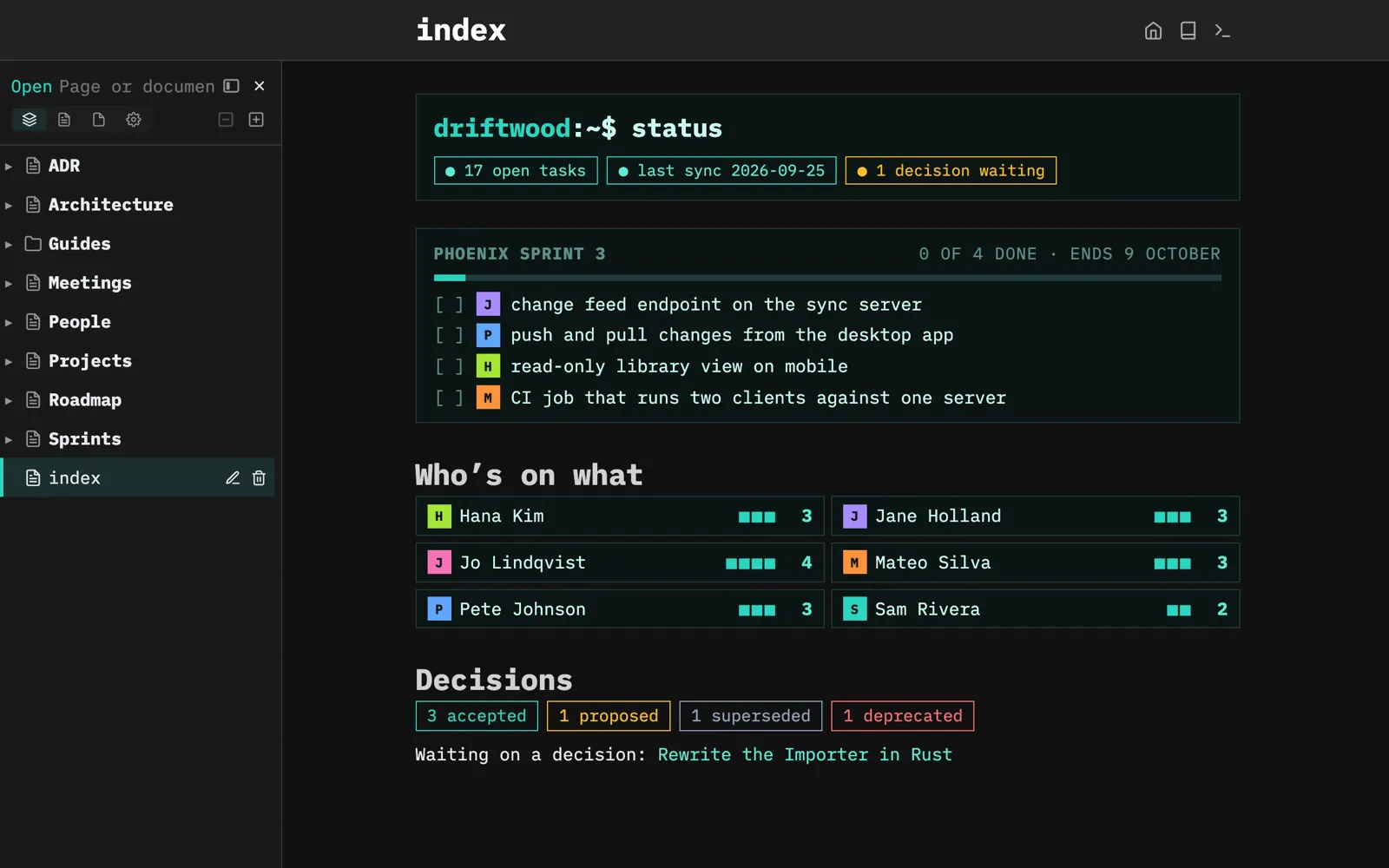
Where the team stands.

The home page shows the current sprint and who owns each task, open tasks per team member, and which decisions still need one.

Built with: Space Lua · Space Style · Recipients

Show some code
function team.header()
  local open = query[[
    from t = index.tasks()
    where not t.done and t.recipients
    select t
  ]]
  local waiting = query[[
    from p = index.contentPages "adr"
    where p.status == "proposed"
    select p
  ]]
  -- ...
end
space-lua

From Library/Team Home.

The Driftwood team wiki’s home page in dark mode: a terminal-style status line, Phoenix Sprint 3 with its tasks and owners, open tasks per team member and the decisions by status, with the space tree docked on the left

Architecture, drawn from your page frontmatter.

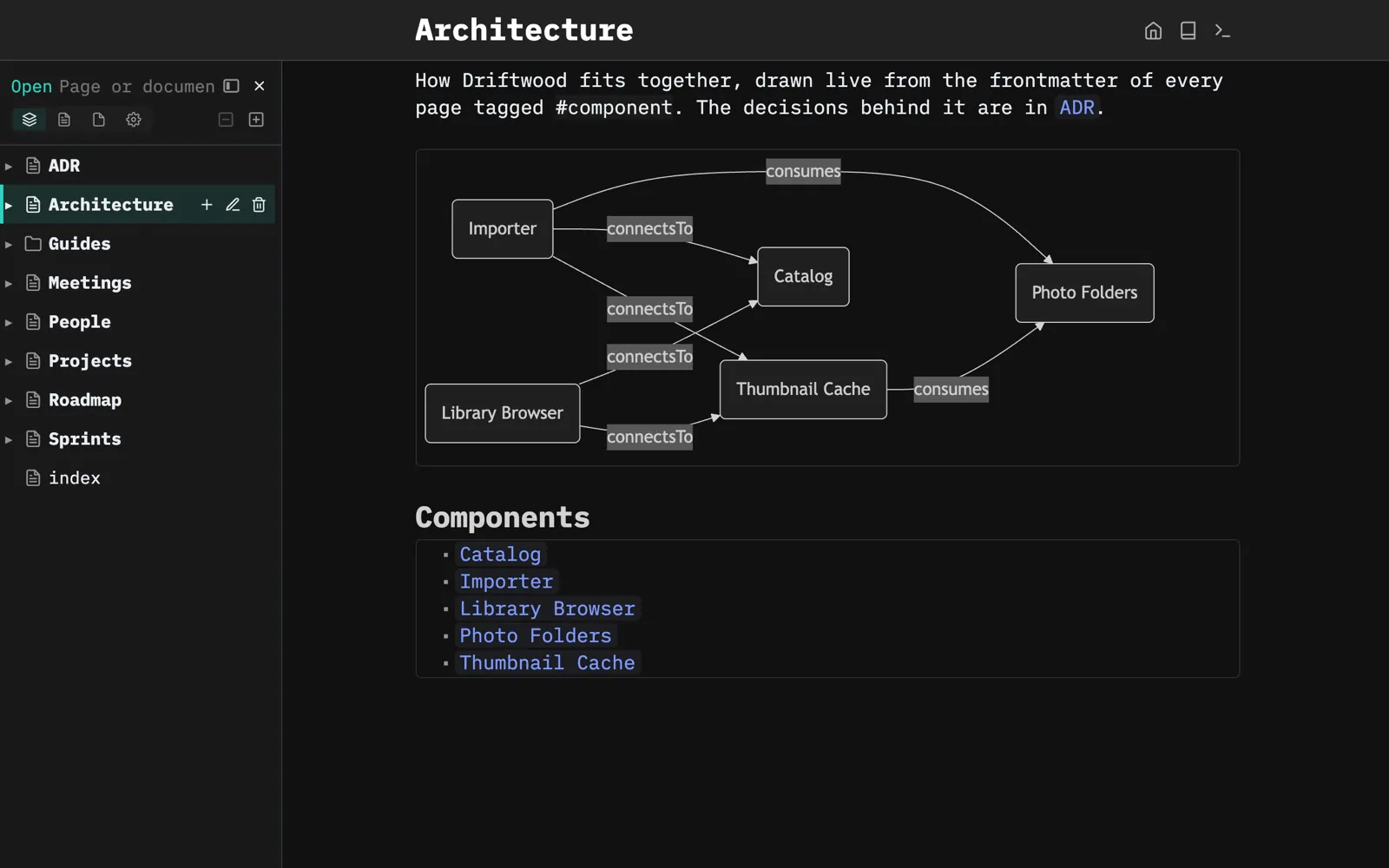
Each component page says what it connects to in its frontmatter, and the Architecture page draws the diagram live. Add a component, and it shows up in the picture.

Built with: Frontmatter · Mermaid diagrams

Show some code
${mermaid.diagram(mermaid.relationGraph {
  pages = query[[from index.contentPages "component"]],
  direction = "LR",
})}

From Architecture.

The Architecture page: a live diagram of how the importer, library browser, catalog, thumbnail cache and photo folders connect, above the list of components

Every decision in one place.

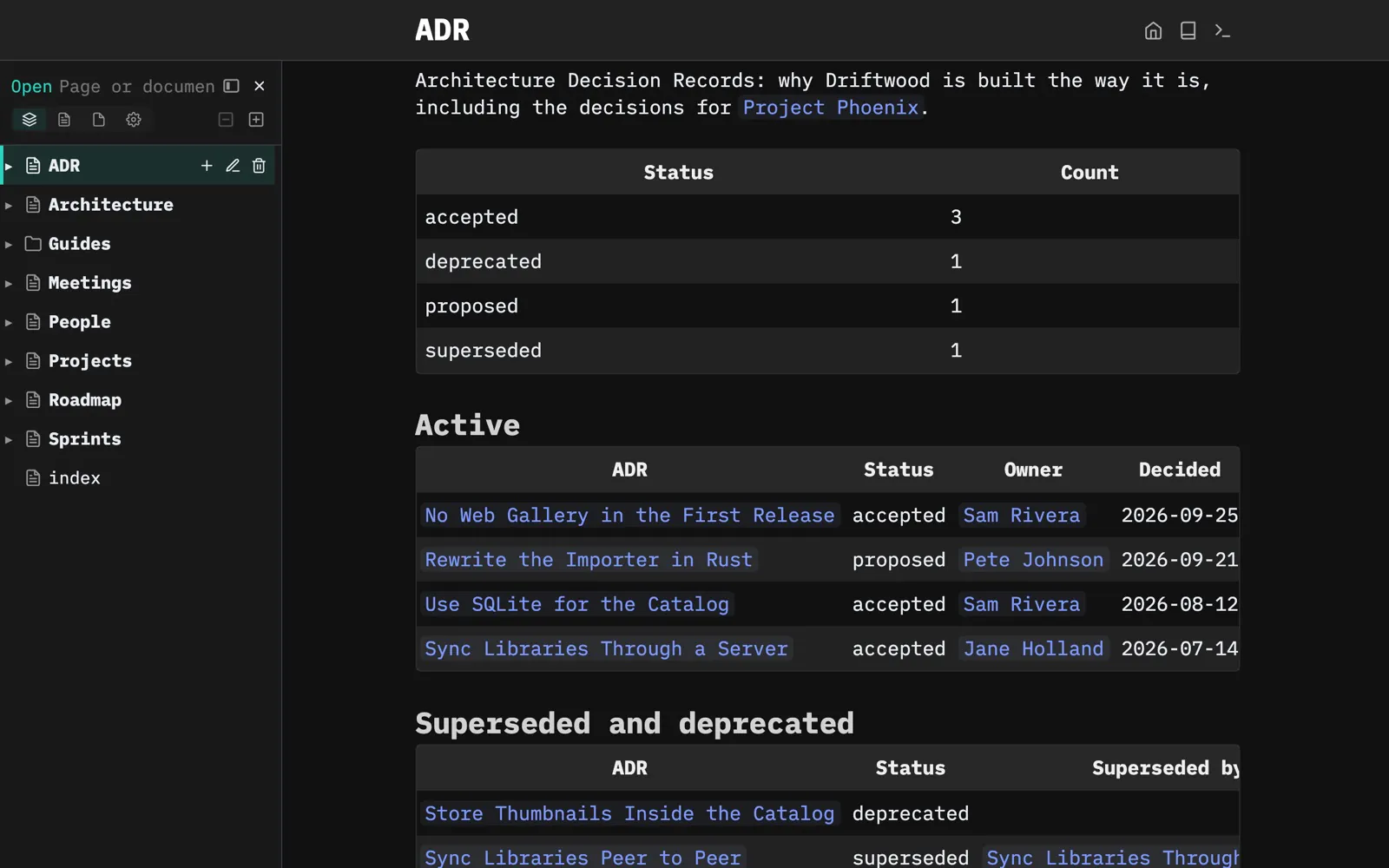
Decisions are pages with a status, owner and date. This page counts them by status, lists the active and the superseded ones, and draws how they relate.

Built with: Queries · Frontmatter

Show some code
${query[[
  from p = index.contentPages "adr"
  where p.status ~= "superseded" and p.status ~= "deprecated"
  order by p.date desc
  select {
    ADR = "[[" .. p.name .. "]]",
    Status = p.status,
    Owner = p.owner,
    Decided = p.date,
  }
]]}

From ADR.

The ADR page: decisions counted by status, the active ones with owner and date, and the superseded and deprecated ones

Assign with an @mention.

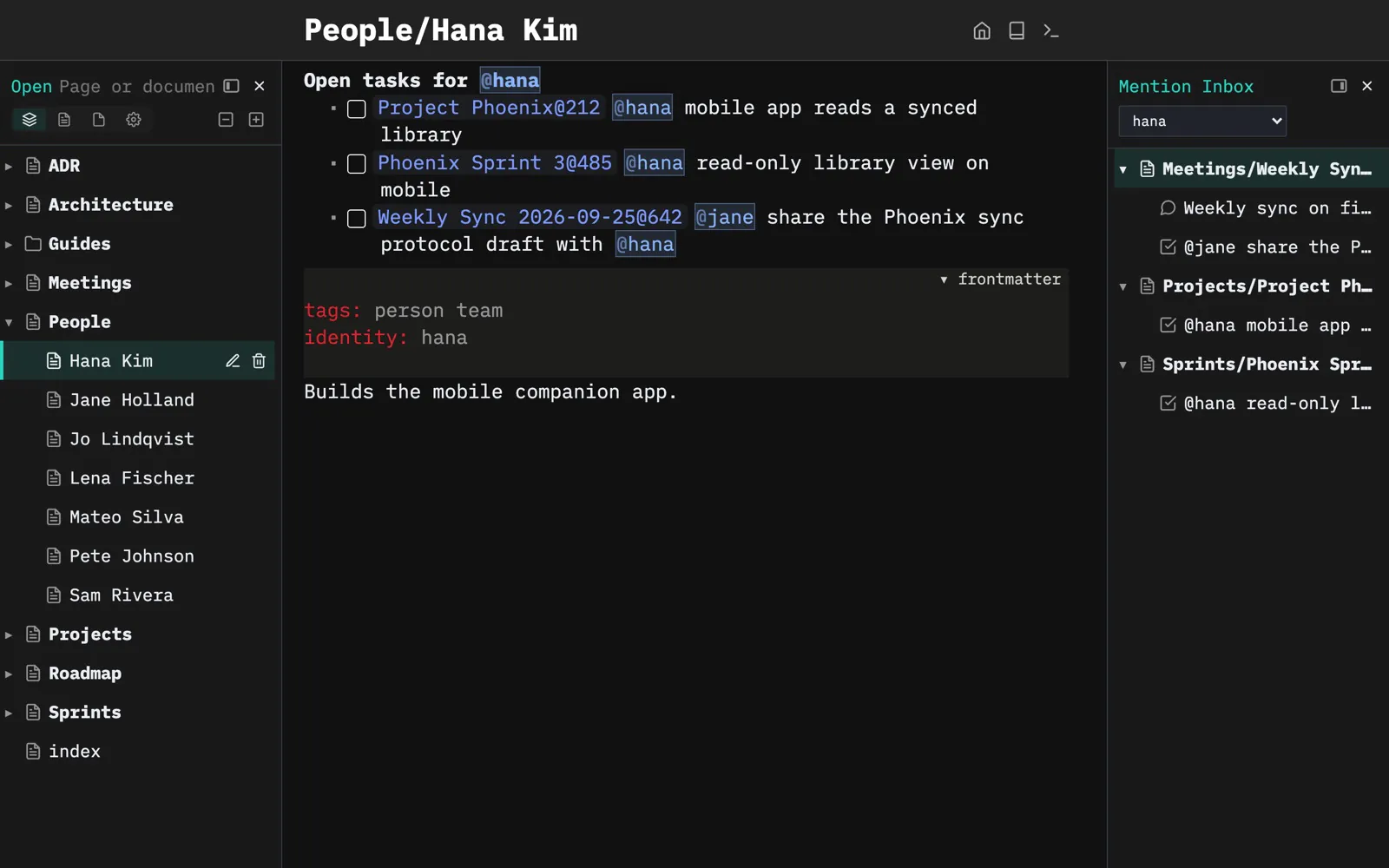
Write @hana in a task and it lands in Hana’s open tasks and in her Mention Inbox, whether it’s in the sprint, a project or the weekly sync. One view puts those open tasks at the top of every person page.

Built with: At-mentions · Recipients · Views

Show some code
view.define {
  name = "team.openTasks",
  dock = "page-top",
  frame = "minimal",
  refreshOn = { "navigate", "index" },
  content = function()
    local id = (editor.getCurrentPageMeta() or {}).identity
    if not id then return nil end
    local tasks = team.openTasks(id)
    if #tasks == 0 then return nil end
    return "**Open tasks for @" .. id .. "**\n" .. table.concat(tasks)
  end,
}
space-lua

From Library/Team Home.

Hana Kim’s page listing the three open tasks addressed to her, next to the Mention Inbox filtered on hana

Discuss it right there.

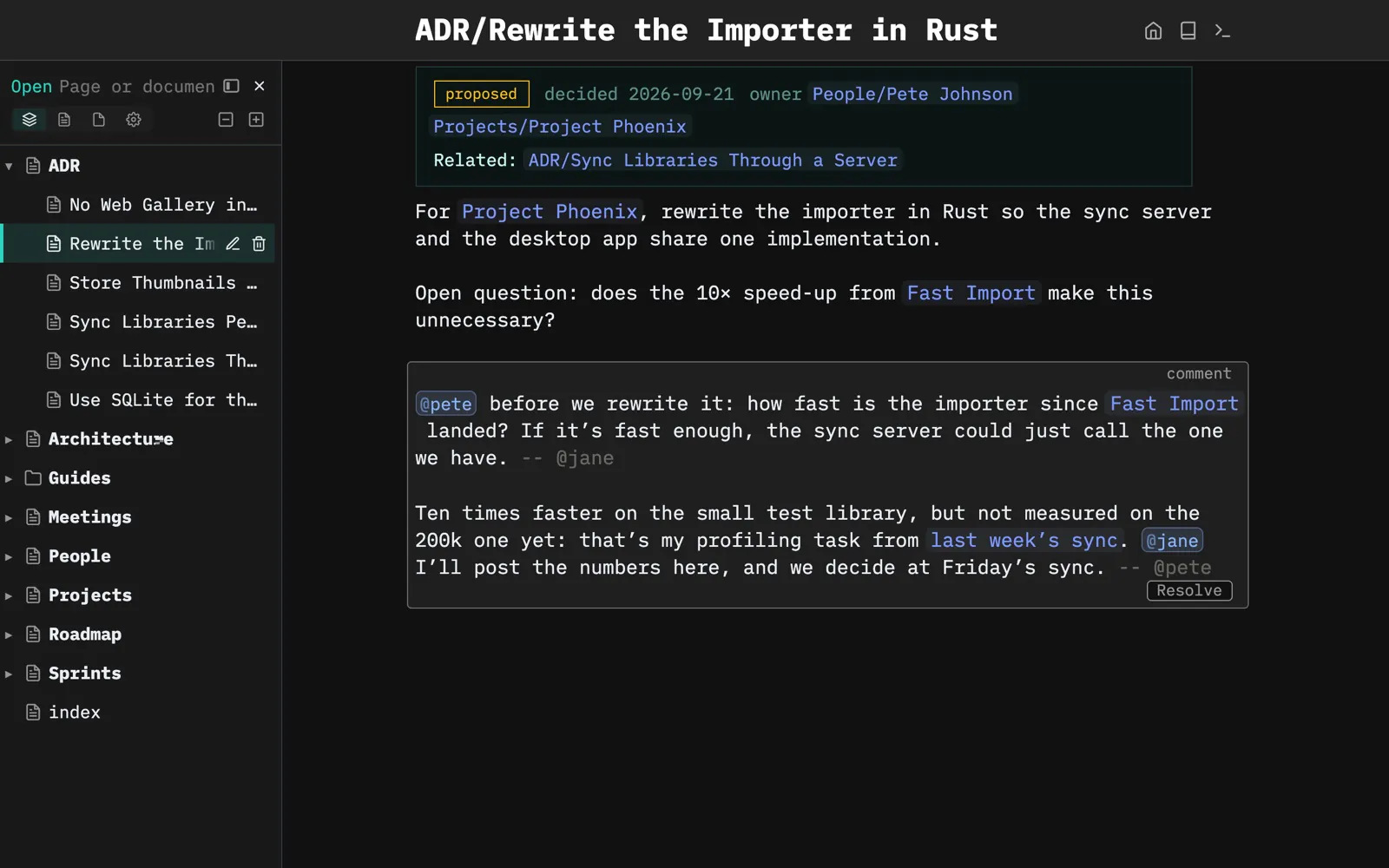
Questions go in a comment next to what they’re about. Jane asks Pete about a proposed decision with @pete, Pete signs his reply and answers back to @jane, and each mention lands in that person’s Mention Inbox. Once it’s settled, resolve the comment.

Built with: Comments · At-mentions · Signatures · Frontmatter live previews

A proposed decision with a comment thread underneath: Jane asks Pete with an @mention whether the importer is fast enough already, and Pete signs his reply and promises her the numbers

And also...

Two ways to collaborate, at two speeds: pick the one that fits your team, or use both.

A live wiki, in real time

This is how Driftwood works. Everyone works in the same space on your SilverBullet Server, from the browser or synced from Desktop. Assign a task with @pete, and it lands in Pete’s Mention Inbox. Reply in a comment, right where the question was asked. Edits from teammates show up as they happen. Everything gets versioned centrally with Git.

Docs as code, through pull requests

The slower, more deliberate way. Keep your docs as markdown in your repository, versioned together with the code they describe. Everyone writes in SilverBullet on their own checkout, and changes are proposed, reviewed and merged in pull requests, like the code. More on docs as code →

What you get

History for every page.

SilverBullet can keep every change in git automatically, so you can see who changed what, and roll back.

Plays well with others.

Other editors, scripts and coding agents can edit the same files, SilverBullet merges their changes in.

Nothing to migrate out of.

It’s markdown in a folder. If you ever leave, you take everything with you.

Set up a space for your team.

Get started